How to add a tourist accommodation registered with the Ministry of Interior in Raixer
Integrate your tourist accommodation with Raixer Check-in and SES.HOSPEDAJE as per Royal Decree 933/2021. Learn how to comply with Spanish regulations, avoid sanctions, and automate guest reporting. Get started today!
As of December 2, 2024, sending information to SES.HOSPEDAJES is mandatory in all autonomous communities of Spain, except in Euskadi and Catalonia, as established in Royal Decree 933/2021.
If you manage tourist apartments and use Raixer Check-in, it is crucial that you update the configuration of your accommodations to connect them with SES.HOSPEDAJES after having previously registered your establishments on their platform.
In Catalonia, reporting must continue to be done through the Mossos website, so you can continue using Raixer Check-in as usual.
In Euskadi, the Ertzaintza has developed a new version of its system that we have already implemented in our platform.
In this article, we explain step-by-step how to configure Raixer Check-in to automate information submission, avoiding sanctions and facilitating the management of your tourist business.
Step 1: Registration in Ses.Hospedajes
The first step is to register in Ses.Hospedajes. Since the submission of information is mandatory as of December 2, 2024, it is important to do so as soon as possible in order to then configure access in Raixer Check-in.
We have prepared a detailed guide with all the necessary steps to register on the Ses.Hospedajes website and register each of your accommodations. You can access it at this link.
It is essential that, during the process, you check the box "Envío de comunicación por servicio web" (Web service communication sending), as shown in the following image:
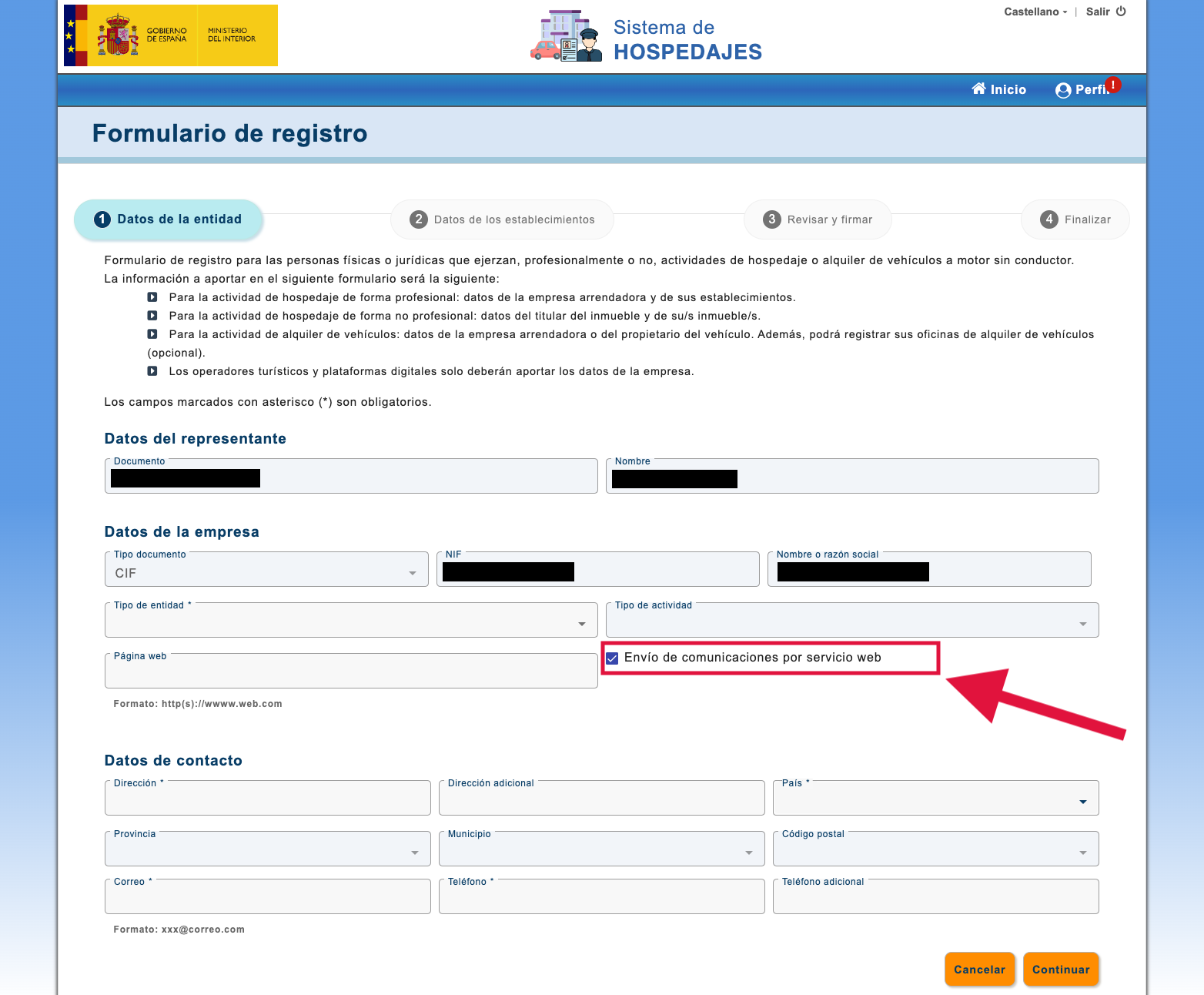
Check the "Envío de comunicación por Servicios Web" (Web Services Communication Sending) box for Ses.Hospedajes.
Step 2: Edit the configuration of my accommodations in Raixer Check-in
Once you have completed the registration in Ses.Hospedajes, you will receive an email with the 4 pieces of information that Raixer Check-in will ask you for each of your accommodations.
Before continuing, we recommend checking the password for "Comunicaciones por Servicios Web" (Web Services Communications). Sometimes, the password provided by Ses.Hospedajes in the initial email may become invalid for no reason. If you registered more than two weeks ago or registered several accommodations, we suggest changing it before continuing. In this article you will find a detailed guide on how to do it.
Next, we show you the steps to configure Raixer Check-in and start sending the information of your bookings and guest records to Ses.Hospedajes.
First, access the configuration section of your accommodations in Raixer Check-in. To do this, go to your device or check-in connection in the application. Then, for each accommodation, click on the edit button, as shown in the following images:
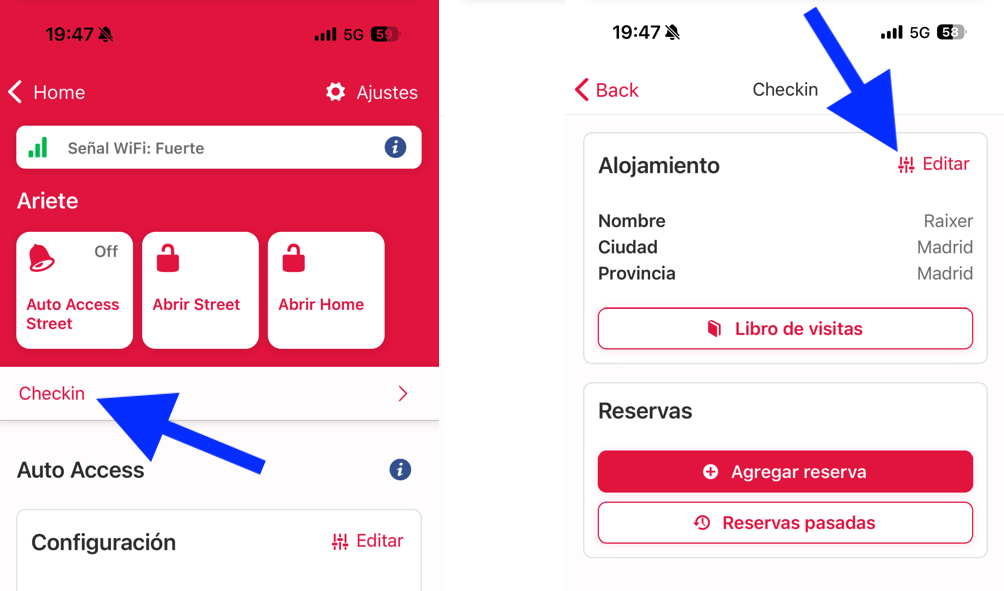
When editing an accommodation, you can modify the current configuration and the data related to the authority to which Raixer Check-in will send the information of your bookings and guests.
Scroll down and select "Ministerio" (Ministry) in the selector. Once you do this, Raixer Check-in will ask you for the connection data with Ses.Hospedajes, which we detail below.
What Ses.Hospedajes data do I need to enter in Raixer Check-in?
To connect Raixer Check-in with Ses.Hospedajes, you must enter the following 4 pieces of information that you will receive by email after registering:
1. Landlord code: A 10-digit number assigned to your account in Ses.Hospedajes. If you have several accommodations, this code will be the same for all of them.
• Example: 0000025200
2. Establishment code: A 10-digit number assigned to each accommodation registered in Ses.Hospedajes.
• Example: 0000035224
• If you have more than one accommodation, each one will have a different code, so make sure you enter the correct one in Raixer Check-in.
3. User: This is the identifier for Ses.Hospedajes Web Services Communications. It will usually be your NIF or CIF, ending in WS.
• Example: If your NIF is 00000000T, your user will be 00000000TWS (unless Ses.Hospedajes changes the format).
• Note: This user is not for accessing the Ses.Hospedajes website, only for Raixer Check-in to send data.
4. Password: Specific key for Ses.Hospedajes Web Services Communications. It is not the same as the one used to log in to the Ses.Hospedajes website.
• Recommendation: Before entering it in Raixer Check-in, change the password in Ses.Hospedajes, as often the initial one does not work correctly.
Verification of connection data
Once the data has been entered in Raixer Check-in, click "Save". The system will verify the connection with Ses.Hospedajes. If the data is incorrect, an error message will appear.
I do not receive the email with Ses.Hospedajes data
If you have not received the email with the connection data, follow these steps:
1. Check your inbox and spam folder. Most of the time the email has been sent, but it may be in another folder or blocked by the email provider.
2. If the email is not there, try the following:
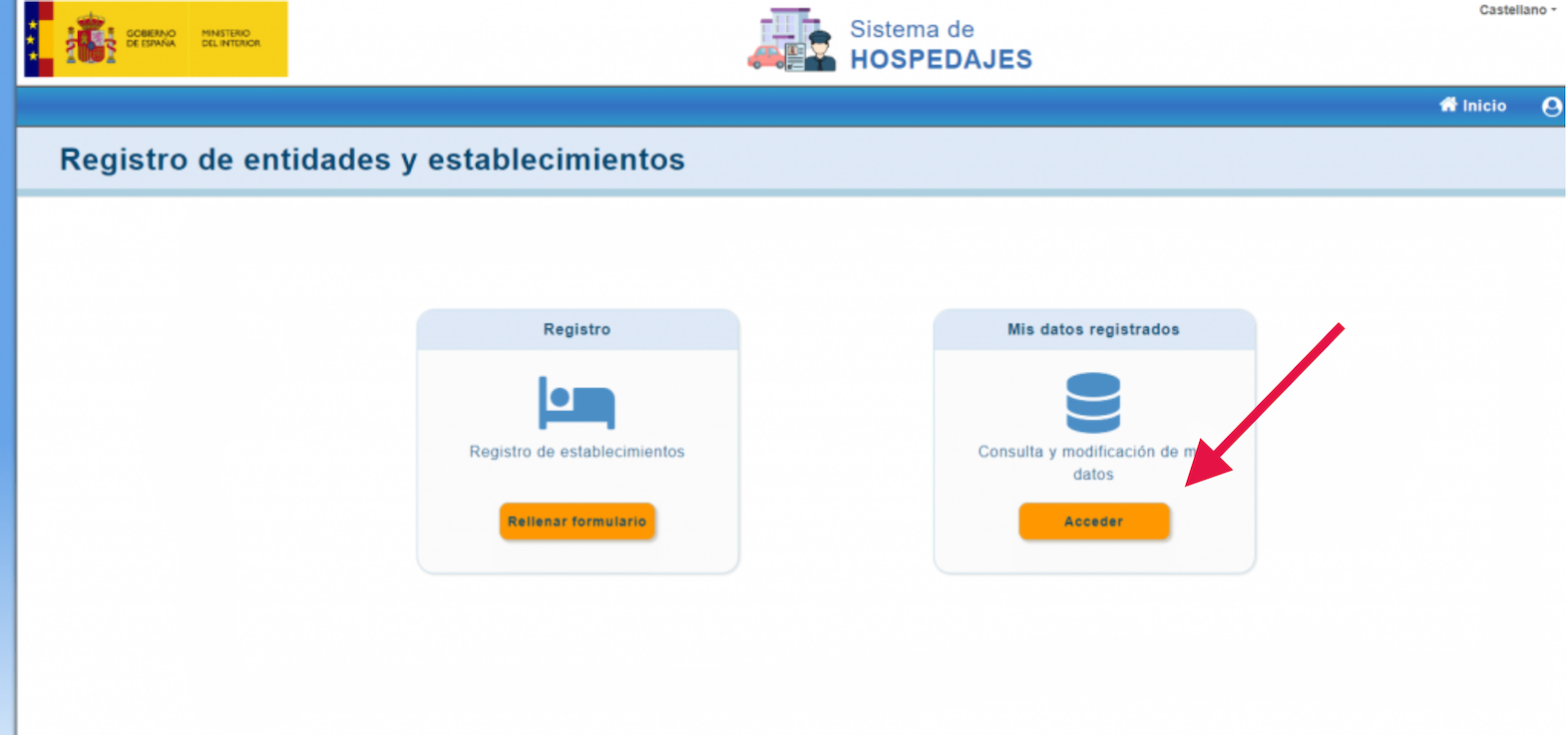
• Access your Ses.Hospedajes account → My registered data.
• Uncheck the "Envío de comunicación por servicio web" (Web service communication sending) box and save the changes.
• Log out, log in again, check the box again and save the changes.
• This should make Ses.Hospedajes resend the email with the data.
3. If you still do not receive the email, contact Ses.Hospedajes by writing to ses.hospedajes@interior.es
Connection errors with Ses.Hospedajes
When you create a tourist accommodation in Raixer Check-in or when you edit it, upon clicking the "Save" button, Raixer Check-in will check against Ses.Hospedajes whether the connection data you have entered is correct. If it is correct, you will see a success message; otherwise, you will see an error message.
Incorrect User or Password
If Raixer Check-in shows you the error message Incorrect User or Password, it almost always means that the password you have entered is not correct for Web Services Communications for that user.
Remember that, as we explained earlier, it is not the password to enter Ses.Hospedajes, and even if you are entering the password for Web Services Communications that Ses.Hospedajes sent you in the email, it may no longer be active.
100% of the time, this error is resolved by changing the password for Web Services Communications in Ses.Hospedajes and trying again later in Raixer Check-in. Obviously, we assume that you are entering your correct Web Services Communications user (your NIF or CIF ending in WS, without hyphens, spaces or anything else, such as 00000000TWS).
Steps to resolve the error
1. Verify the user
• Make sure the user is correct. It should be your NIF or CIF ending in WS.
• Check in Ses.Hospedajes under "Gestión de mis credenciales de acceso al servicio web" (Management of my web service access credentials).
• Make sure you are not introducing additional spaces when copying and pasting.
2. Verify the correct password
• It must be the password for "Envío de comunicaciones por servicios web" (Sending communications via web services), not the one for accessing Ses.Hospedajes.
• Copy correctly from the Ses.Hospedajes email and verify capitalization.
3. Change the password for Web Services Communications
• If the above data is correct but you still get the error, change the password in Ses.Hospedajes and try again.
4. Check the landlord code and establishment code
• If all the above is correct and the error persists, verify that the codes are correct.
Sending bookings to Ses.Hospedajes
According to the new Royal Decree 933/2021, it is not only mandatory to send guest records to the Ses.Hospedajes platform of the Ministry of Interior, but it is now also required to report bookings as soon as they are received.
However, Ses.Hospedajes has confirmed that it is only necessary to notify bookings that are managed directly, such as those received by phone, email, etc. If the booking comes from an OTA, such as Booking, Expedia or Airbnb, it is not necessary to send it, as these platforms are responsible for doing so.
Likewise, Ses.Hospedajes has clarified that if payment is managed by the OTA and not by the accommodation, the latter is not obliged to provide information about the transaction, as it does not even have access to that data.
Complying with Royal Decree 933/2021 is essential to maintain the smooth operation of your tourist business. Configuring Raixer Check-in with SES.HOSPEDAJES will allow you to automate the sending of guest records and bookings, ensuring regulatory compliance simply and effectively.